All your VPNs behind one macOS menu bar icon
AnyConnect and FortiGate behind one menu bar icon with SwiftBar. And why openfortivpn should not get root through a single sudoers line.
Every day I connect to three VPNs: Cisco AnyConnect with Duo push, AnyConnect with SMS verification, and a FortiGate where I sign in with SSO in the browser. Three apps, three windows, three routines. To find out which one was connected, I had to open all of them.
What I wanted was one icon in the menu bar, one click to connect, and a clear view of what it’s waiting for. The biggest lesson, though, was how to give a VPN client root without opening a back door.
The code is public on GitHub as a template you fill in with your own VPNs. This post is mostly about why it’s built the way it is.
The building blocks
- SwiftBar turns any script into a menu bar item. Whatever the script prints is the menu.
- Cisco Secure Client has a CLI next to the GUI, driven by
expect. - openfortivpn instead of FortiClient, which has no CLI on macOS.
- Keychain for passwords. The script pulls a password only when the VPN client asks for it, so none ever sits in the scripts or the config.
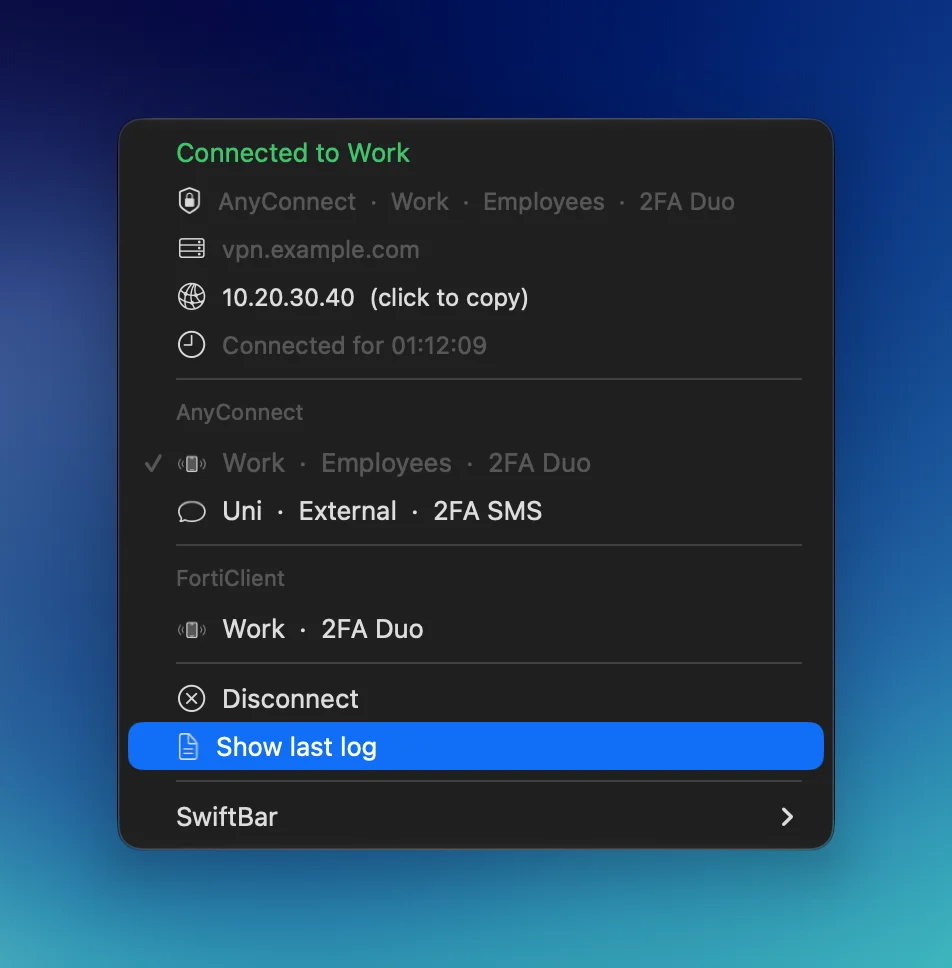
While connecting, the menu shows what it’s waiting for, such as “Approve the Duo push on your phone” with a Cancel button. When the connection drops, a notification offers Reconnect.
2FA, however, stays with me. I approve the Duo push on my phone and type the SMS code into a dialog that pops up while connecting. The script could read it from Messages, but SwiftBar would need Full Disk Access, and it would bypass exactly what 2FA is for: me confirming the login.
AnyConnect from the CLI
Connecting is one command and a few answers to prompts. This is what cost me the most time:
- The CLI won’t connect while the GUI is running, even with the window hidden. The app has to actually quit.
- You can’t pipe all the answers in at once. Some VPN servers then fail on certificate validation.
- Pick the group by number, not by name. With the name, the server rejects the login and doesn’t say why.
- The password must not arrive too early, or the client drops it. Waiting half a second is enough.
- Never turn on
expectdebug output. It logs the password in clear text.
Root without a back door
openfortivpn needs root, and SwiftBar can’t ask for a sudo password. The first thing most people reach for is a single sudoers line:
jdoe ALL=(root) NOPASSWD: /opt/homebrew/bin/openfortivpnIt looks harmless, but it’s a root shell for anything running as my user. Homebrew is owned by the user, so the binary, its libraries and its config can all be swapped without a password, and the next connect runs them as root.
Instead, there’s a small root helper that gets installed once with sudo:
- it copies openfortivpn and its libraries to a place owned by root,
- it accepts only a handful of exact commands and connects only to servers on its list,
- the sudoers rule allows exactly those commands and nothing else.
The trade-off is that after brew upgrade the installer has to run again. That’s by design: nothing I change as a regular user reaches root without my sudo.
And if you want to verify it: sudo -n -l is not a reliable test for whether a command runs without a password. For an admin it says yes even when a password is required. The reliable test is sudo -k; sudo -n <command>.
When DNS is down
I also run DNS recursors, and I often update them over the VPN. I reach devices by IP address, but the VPN connects to a hostname. If an update goes wrong, I don’t want to be locked out exactly when I need to fix it.
So the helper keeps the VPN server addresses in /etc/hosts. Before every connect it checks them against DNS, and when DNS doesn’t answer, it uses the last known address. The hostname stays the same, so certificate validation keeps working.
Where to start
Describe your VPNs in vpn.conf, one line each. The full setup, including Keychain and the root helper, is in the README. The short version:
git clone https://github.com/jozefrebjak/swiftbar-vpn.git ~/swiftbar-vpn
~/swiftbar-vpn/install.sh
$EDITOR ~/swiftbar-vpn/vpn.conf
# id type label host group user 2fa
work anyconnect Work vpn.example.com Employees jdoe duo
uni anyconnect Uni ra.example.edu External jdoe sms
work-forti forticlient Work fw.example.com:10443 - - duoFor now it covers AnyConnect and FortiClient, the ones I use every day. OpenVPN and WireGuard are coming soon.
jozefrebjak/swiftbar-vpnAll your VPNs behind one menu bar icon: AnyConnect and FortiClient, Duo and SMS, a locked-down root helper for openfortivpn and a DNS fallback in /etc/hosts.
View on GitHub →I did look at Tunnelblick and Viscosity, but they mostly cover OpenVPN and WireGuard, not AnyConnect with Duo or a FortiGate with SSO. If you handle VPNs on a Mac differently, or know a saner way to give a menu bar VPN client root, let me know on LinkedIn or GitHub.