PPPoE sessions from Cisco ASR1000 in LibreNMS: a custom v2 plugin
LibreNMS knows nothing about PPPoE sessions on Cisco ASR1000. I built a v2 plugin on top of CISCO-PPPOE-MIB: all BRASes on one page, PTA/FWDED/TRANS breakdown and a subscriber list.
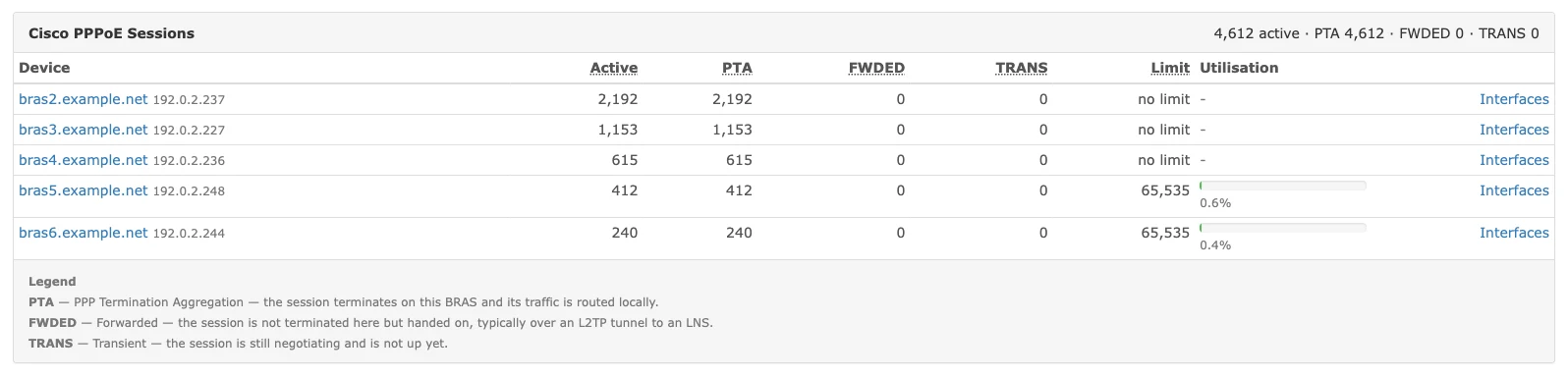
The goal was simple: see all five BRASes and their PPPoE session counts in one place.
LibreNMS gives me CPU, memory, port traffic and temperatures from the ASR1000s. About sessions, nothing. And that’s the one number I actually need as an admin: how many sessions sit on which BRAS. Until now that meant SSH and show pppoe summary on five devices:
bras6#show pppoe summary
    PTA  : Locally terminated sessions
    FWDED: Forwarded sessions
    TRANS: All other sessions (in transient state)

                                TOTAL     PTA   FWDED   TRANS
TOTAL                             240     240       0       0
TenGigabitEthernet1/0/0            90      90       0       0
TenGigabitEthernet1/1/0           150     150       0       0
Fine once in a while, useless for a trend and hopeless for an alert.
What came out of it is a custom v2 plugin for LibreNMS. This is what it looks like today:
How I got there, and where I got it wrong on the way:
Custom OID first, because it takes five minutes
LibreNMS has Custom OID right in the device edit form: you enter an OID, a data type and a unit, and the poller starts writing it to RRD and graphing it. If a single number is all you need, you don’t have to write anything.
For the total session count that is:
| Field | Value |
|---|---|
| OID | .1.3.6.1.4.1.9.9.194.1.1.1.0 |
| Data Type | GAUGE |
| Unit | sessions |
That’s cPppoeSystemCurrSessions from CISCO-PPPOE-MIB. The trailing .0 is mandatory, it’s a scalar. Without it Test OID fails.
I did this first and it worked immediately. I had a session count graph per BRAS. Except:
- the PTA / FWDED / TRANS breakdown only exists per interface in the MIB, which would mean one Custom OID per ifIndex, and a single ASR has over 4,000 of them,
- I can’t see who is connected, so when I’m looking for a specific customer a number doesn’t help,
- and it isn’t an overview, I still have to click through five devices to know how the network is doing overall.
So Custom OID, yes, it’s ideal for history. But for “what is happening right now” I needed something else.
Phase zero: don’t guess OIDs
I consider this the most important part, and also the one it’s most tempting to skip.
LibreNMS does not ship CISCO-PPPOE-MIB or CISCO-SUBSCRIBER-SESSION-MIB, they’re simply not in mibs/cisco/. So I pulled them from Cisco’s official GitHub repository and had the numeric OIDs generated:
curl -O https://raw.githubusercontent.com/cisco/cisco-mibs/main/v2/CISCO-PPPOE-MIB.my
snmptranslate -M +mibs -m CISCO-PPPOE-MIB -On CISCO-PPPOE-MIB::cPppoeSystemCurrSessions
# .1.3.6.1.4.1.9.9.194.1.1.1
Then I verified the same thing with snmpwalk against a live ASR. Only once the device answered did I start writing code.
The reason: the plugin queries devices with numeric OIDs exclusively. If it relied on MIB files at runtime, I’d have to ship them into the container and deal with mibDir. This way the MIB files in the repo are only a reference for a human asking “and what does that number actually mean”.
What’s in those MIBs
CISCO-PPPOE-MIB (1.3.6.1.4.1.9.9.194) gives you, at device level:
| OID | Object | What it returns |
|---|---|---|
...194.1.1.1.0 | cPppoeSystemCurrSessions | active sessions |
...194.1.1.2.0 | cPppoeSystemHighWaterSessions | all-time high |
...194.1.1.3.0 | cPppoeSystemMaxAllowedSessions | limit |
...194.1.1.5.0 | cPppoeSystemExceededSessionErrors | rejected due to the limit |
Plus cPppoeSessionsPerInterfaceTable, indexed by ifIndex, which carries total, PTA, FWDED, TRANS and the trap thresholds for every interface.
Those three abbreviations are worth spelling out, because the MIB gives them no context:
- PTA: PPP Termination Aggregation, the session terminates on this BRAS and its traffic is routed locally
- FWDED: the session is not terminated here, it’s handed on, typically over an L2TP tunnel to an LNS
- TRANS: transient, the session is still negotiating
CISCO-SUBSCRIBER-SESSION-MIB (...786) goes one level deeper: one row per subscriber, with username, state and IP address. There’s a catch there, which I’ll get to.
Why a plugin and not a polling module
I did consider adding a polling module to LibreNMS core (LibreNMS/OS/Iosxe.php). A plugin won for two reasons: I don’t want to maintain a LibreNMS fork and resolve conflicts on every upgrade, and the per-interface breakdown has nowhere to be stored anyway without a schema of my own.
A LibreNMS v2 plugin is a surprisingly simple thing. You clone a directory into app/Plugins/PluginName/ and implement hooks:
DeviceOverview.php      panel on the device page
Menu.php                menu entry
Page.php                standalone page
Settings.php            configuration
resources/views/*.blade.php
The structure is validated before installation and it’s case-sensitive. In each hook class you only override data() and authorize(), handle() is final.
It sounds straightforward, and it is. You just need to know about four things that aren’t in the documentation.
Four traps that cost me the most time
1. authorize() must not type-hint App\Models\User
This one cost me the most. The device overview panel worked, but the page and the settings both threw “Missing view”. No error in the log, nothing.
Hooks are invoked through app()->call(), so arguments get resolved from the Laravel container. And App\Models\User is not bound there, AppServiceProvider binds only Device out of the models. Laravel therefore dutifully builds a fresh, empty User instance, $user->can('global-read') returns false, the hook gets filtered out and the controller falls back to the plugins.missing view.
The panel worked for one simple reason: it was the only hook that never touched $user.
The fix is to type-hint the contract Laravel binds to the authenticated user:
use Illuminate\Contracts\Auth\Authenticatable;

public function authorize(Authenticatable $user): bool
{
    return $user->can('global-read');
}
Incidentally, this is exactly what ExamplePlugin shipped with LibreNMS does, even though the abstract hook class declares User. Had I looked at it sooner, I’d have saved an hour.
2. SettingsHook calls data() twice
This is visible at a glance in the source, and you can still walk right into it:
final public function handle(string $pluginName, array $settings, Application $app): array
{
    return array_merge([
        'content_view' => Str::start($this->view, "$pluginName::"),
    ], $this->data($app->call($this->data(...), [
        'settings' => $settings,
    ])));
}
The inner call gets the real settings. The outer one gets the result of the inner call as its $settings argument. And the outer one is what gets returned.
So if data() returns ['settings' => $settings, ...], the second pass receives a wrapped array and your template ends up with $settings['settings']. I deal with it by unwrapping right at the entry point:
public static function unwrap(array $settings): array
{
    if (isset($settings['settings']) && is_array($settings['settings'])) {
        return $settings['settings'];
    }

    return $settings;
}
It gets worse when data() has a side effect. I have a button there that creates Custom OIDs: the first pass created them, the second saw them already there and reported “already exists”. That’s why the result is remembered on the hook instance.
3. numeric() and hideMib() cancel each other out
Various guides chain SnmpQuery::device($device)->numeric()->hideMib()->walk($oid). The problem is that both methods set the same property, oidFormat, and hideMib() comes second, so it wins:
public function numeric(bool $numeric = true): SnmpQueryInterface
{
    $this->options->oidFormat = $numeric ? SnmpOidOutput::Numeric : SnmpOidOutput::Module;
    return $this;
}

public function hideMib(): SnmpQueryInterface
{
    $this->options->oidFormat = SnmpOidOutput::Suffix;
    return $this;
}
Instead of numeric OIDs you get a bare suffix and your parser breaks its teeth on it. I only use ->numeric().
A bonus: in LibreNMS 26.8 the SNMP layer lives in LibreNMS/Data/Source/NetSnmpQuery.php, on current master it has moved to Data/Source/Snmp/. That’s why the code uses the global SnmpQuery alias rather than the namespace directly. Nothing breaks on upgrade that way.
4. net-snmp guesses the OCTET STRING format, and sometimes guesses wrong
This is the nastiest one, because it looks like it works.
A subscriber’s IP address is an InetAddress, meaning a four-byte OCTET STRING. With no MIB loaded net-snmp has no display hint, so it guesses: if the bytes look “printable” it prints them as text, otherwise as hex. So 100.64.16.41 arrives as 64 40 10 29 (fine, I can parse that), but 100.64.13.53 arrives as d@ plus a control character that scrambled the whole terminal output.
While debugging I saw it literally like this, one line in the middle of the dump overwritten by itself:
100030     user05@example.net     3      "64 40 08 C7 "
y"0032     user06@example.net     3      "d@
100035     user07@example.net     3      "64 40 0B 92 "
The fix is not to guess and to ask for hex explicitly. LibreNMS allows that through options():
SnmpQuery::device($device)->options(['-OQXUtenx'])->walk($oid);Those flags aren’t arbitrary, they’re exactly what LibreNMS sends by default (-OQXUte), plus n for numeric OIDs and x for hex. Watch out: in 26.8 options() replaces the other options rather than adding to them.
A few more surprises from the devices
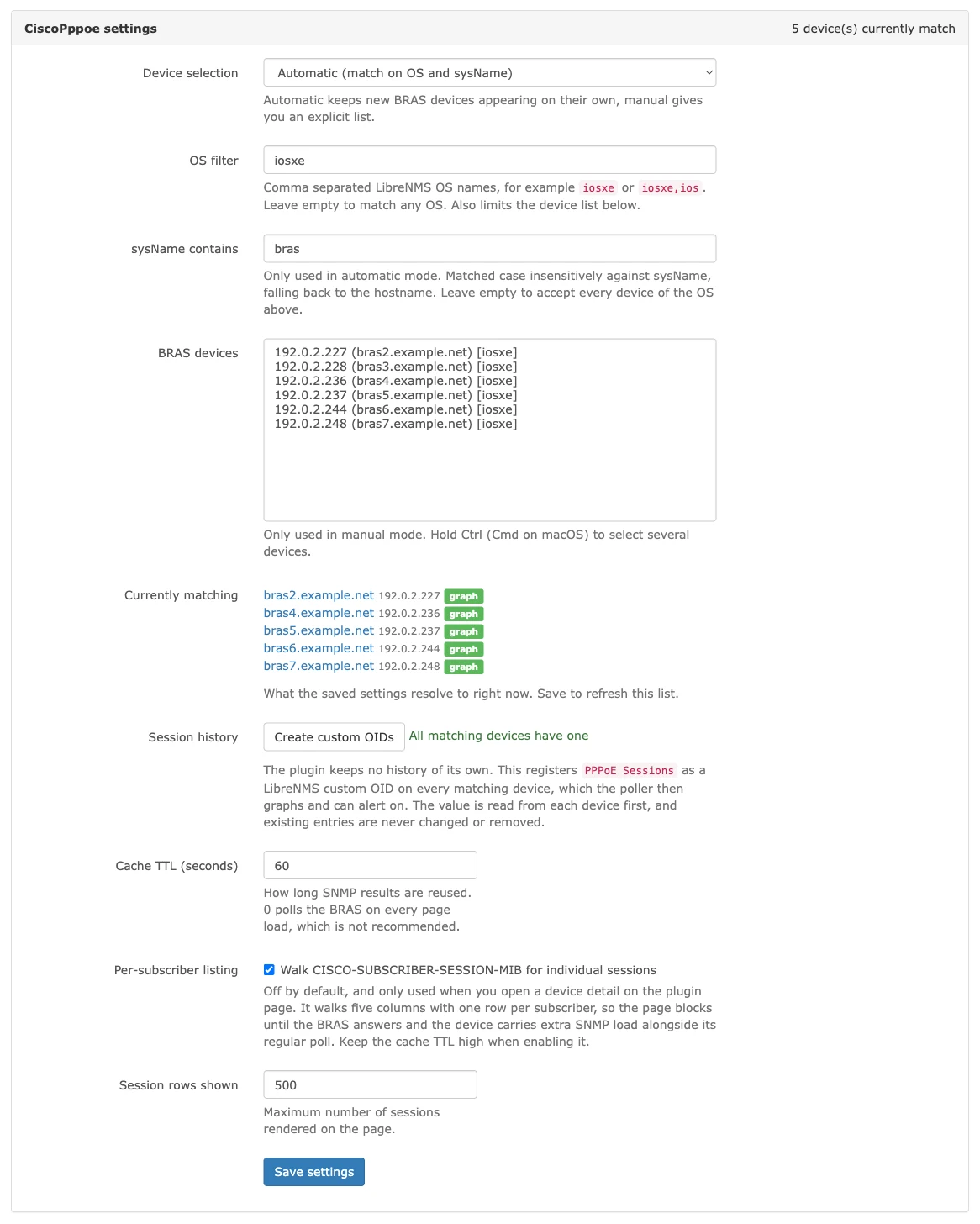
cPppoeSystemMaxAllowedSessions doesn’t return zero when there is no limit. The MIB claims an unset limit is 0. My ASRs return 4294967295, the Unsigned32 maximum. In the UI that looked like a ceiling of 4.3 billion sessions and every utilisation figure came out at 0%. Both values now mean “no limit”.
csubSessionMacAddress is empty. On IOS-XE 15.5(3)S it returns nothing, on every session. I dropped the column from the plugin entirely, which saves a whole walk over a table with one row per subscriber.
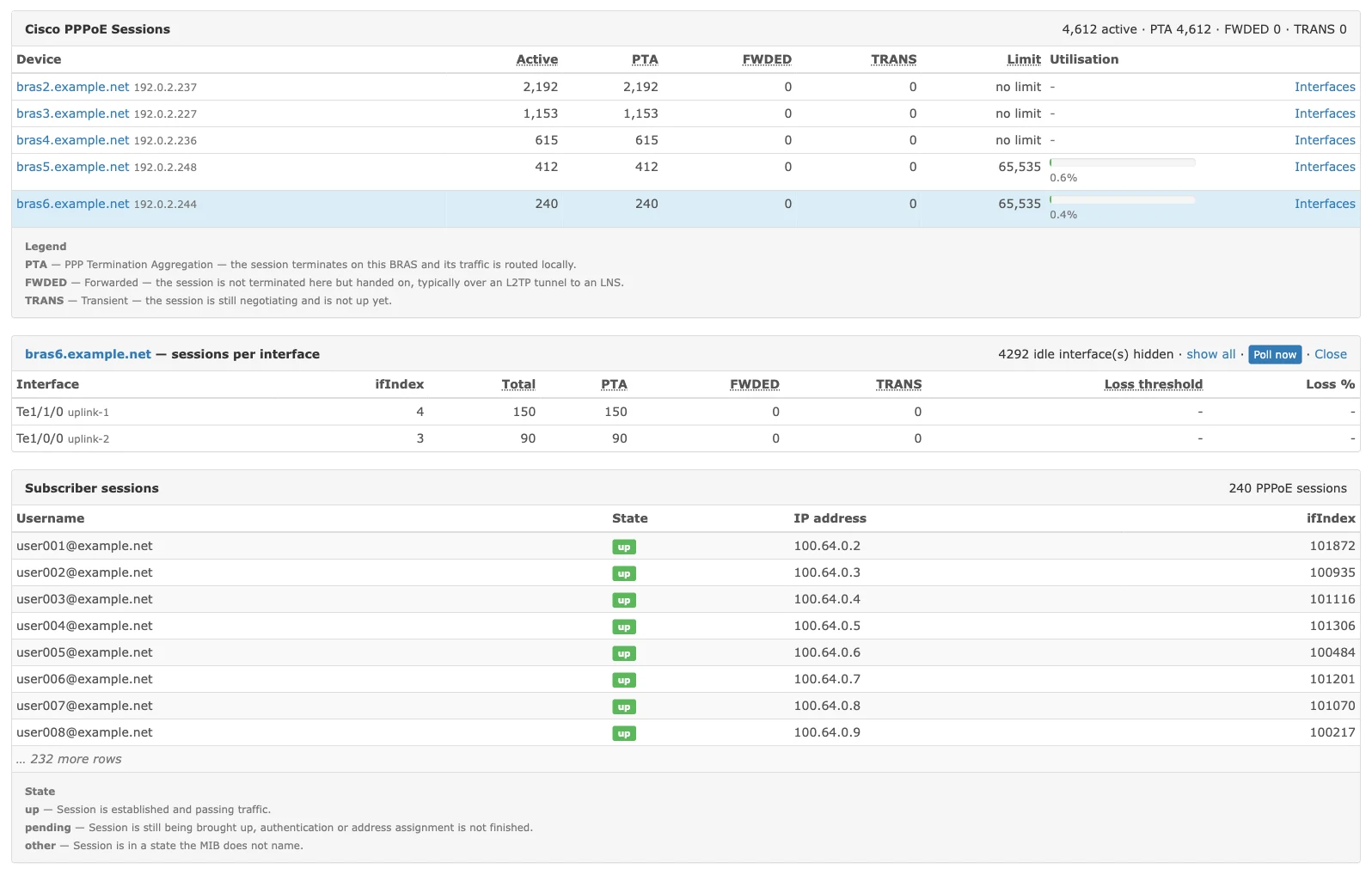
The per-interface table really does cover everything. On one BRAS it returned over 4,000 rows, two of which carried sessions. The rest are sub-interfaces full of zeroes. The default is now to show only the rows that carry something, with a toggle for the rest.
Collecting the data: a plugin has no poller
This is a fundamental limitation you have to make peace with. The v2 plugin system has UI hooks only: DeviceOverviewHook, MenuEntryHook, PageHook, PortTabHook, SettingsHook. None of them runs outside an HTTP request, and a local plugin can register neither an artisan command nor a scheduler. PluginProvider loads hook classes from it and nothing else.
In practice that means everything happens while the page renders. Session counts are cheap, one snmpget and one walk of the physical interfaces. Those I’m happy to fetch on demand and cache.
The subscriber list is a different story: four walks, one row per subscriber. On a BRAS with 2,200 sessions that’s over 8,000 varbinds, and the page would sit and wait for them. The answer:
- the subscriber list is never fetched during rendering, it is read from cache only,
- when the cache is empty, the page offers a Poll the BRAS now button,
- anyone who wants the data ready ahead of time runs the bundled script from cron.
That script bootstraps Laravel outside of a request and fills the cache:
require $installPath . '/vendor/autoload.php';
$app = require $installPath . '/bootstrap/app.php';
$app->make(Kernel::class)->bootstrap();
It’s as close to a poller as a local plugin gets. I don’t use it myself. I open the page occasionally, so cron would be querying the ASRs for nobody.
Graphs: let LibreNMS do it
The plugin stores nothing, so on its own it has nothing to graph. But poller_modules.customoid is enabled in LibreNMS by default, which means the poller collects anything in the customoids table into RRD, draws graphs from it and lets you alert on it.
So I went back to where I started. The plugin settings have a button that registers cPppoeSystemCurrSessions as a Custom OID on every BRAS matching the filter. Before writing the row it reads the value from the device itself, so the poller doesn’t inherit an OID the device won’t answer. The poller only takes rows with customoid_passed = 1.
It deliberately only adds. It never modifies or deletes anything, so no RRD history can be lost.
One small thing I got wrong here too: the link to the graph. LibreNMS only parses path segments containing = as parameters (Url::parseLegacyPath). So device/633/graphs/customoid sets the tab but not the graph group, and you land on whichever group comes first. The correct form is:
device/device=633/tab=graphs/group=customoid/What it adds up to
One page shows me all five BRASes, the total session count, the PTA/FWDED/TRANS breakdown and utilisation against the limit. A click drills down into a single device, where I get sessions per interface and, if I want them, the subscribers with their username, state and assigned IP. The device page carries the same overview in a small panel, with a link to the graph.
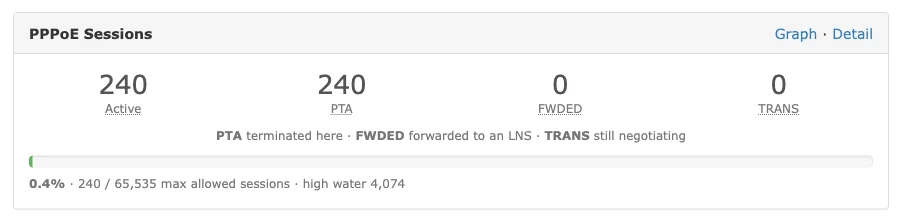
Answering “how many sessions are on which BRAS” is now one look instead of five SSH sessions.
I tested it against LibreNMS 26.8.2 and Cisco ASR1000 running IOS-XE 15.5(3)S. Other platforms may populate those MIBs differently, and the empty MAC and the limit value in particular are worth verifying on different hardware.
jozefrebjak/librenms-plugin-cisco-pppoePPPoE sessions from Cisco BRASes right inside LibreNMS: every device on one page, PTA/FWDED/TRANS breakdown, sessions per interface and a subscriber list.
View on GitHub →If you monitor PPPoE or IPoE termination some other way (RADIUS accounting, streaming telemetry, or something I’ve missed), tell me on LinkedIn or GitHub. SNMP is clearly the least elegant route here, it just happens to be the one I already have enabled everywhere.