SEO for an Astro blog — OG images, JSON-LD and noindex
How I added dynamic Open Graph images, Twitter card meta, JSON-LD structured data and noindex for pagination. Building in public, part three.
The site already has analytics, a sitemap and RSS. Now I’m tackling how it looks when someone shares it on social media — and what Google actually understands about it.
The problem
When I shared a blog post on Reddit, it showed up as a bare link. No image, no description. Google didn’t know it was a blog article with an author and a date. And pagination pages (/blog/2) were needlessly diluting crawl budget.
Three things to fix:
- Open Graph images — branded preview when sharing
- JSON-LD structured data — Google rich results
- noindex — clean the index from thin content pages
Dynamic OG images
Why not static?
I could create images manually in Canva or Figma. But with every new post I’d have to repeat the same steps — open an editor, export a PNG, upload it to the repo.
satori + sharp
Satori by Vercel converts a JSX-like structure to SVG. Sharp then converts SVG → PNG. Everything runs at build time as an Astro API route.
npm install satori sharpThe core generator lives in src/lib/og.ts:
import satori from "satori";
import sharp from "sharp";

const interFont = readFileSync(join(process.cwd(), "src/lib/Inter-SemiBold.ttf"));

export async function generateOgImage({ title, date, tags }: OgOptions): Promise<Buffer> {
  const svg = await satori(
    { /* JSX-like structure with flexbox layout */ },
    { width: 1200, height: 630, fonts: [{ name: "Inter", data: interFont }] },
  );
  return sharp(Buffer.from(svg)).png().toBuffer();
}
Design
Each OG image features:
- Dark gradient background with subtle grid lines
- Gradient border around the edges (cyan → violet)
- Glow effects in the corners
rebjak.combranding with a cyan dot at the top- Title with a gradient accent line underneath
- Date and tag pills at the bottom
Here’s what the result looks like:
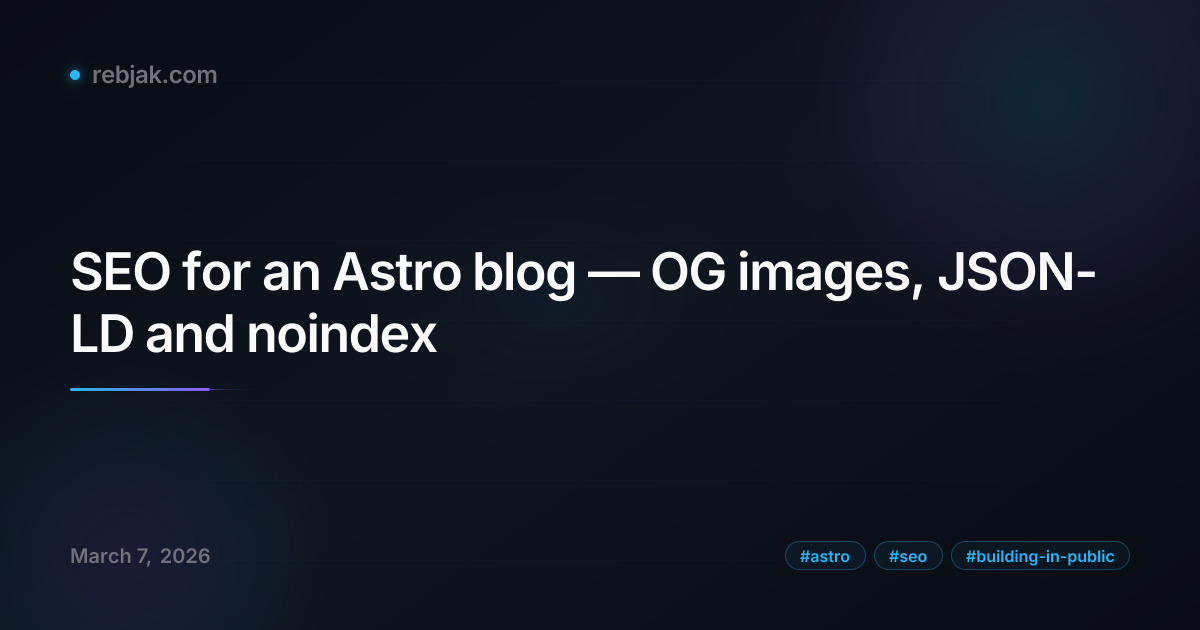
Important: satori doesn’t support .woff fonts — you need .ttf. I downloaded Inter SemiBold from the Google Fonts CDN.
Astro endpoints
Each language version has its own endpoint:
src/pages/blog/og/[slug].png.ts      → /blog/og/staviame-rebjak-com.png
src/pages/en/blog/og/[slug].png.ts   → /en/blog/og/building-rebjak-com.png
src/pages/og-default.png.ts          → /og-default.png (fallback)
getStaticPaths iterates over the content collection and generates a PNG for each post at build time.
Wiring it up in BaseLayout
<meta property="og:image" content={ogImage ?? new URL("/og-default.png", Astro.site).href} />
<meta name="twitter:card" content="summary_large_image" />
<meta name="twitter:image" content={ogImage ?? new URL("/og-default.png", Astro.site).href} />
Each blog post computes its own URL:
const ogImage = new URL(`/blog/og/${slug}.png`, Astro.site).href;JSON-LD structured data
Google Schema.org BlogPosting — added directly to blog post pages:
const jsonLd = {
  "@context": "https://schema.org",
  "@type": "BlogPosting",
  headline: post.data.title,
  description: post.data.description,
  image: ogImage,
  datePublished: post.data.pubDate.toISOString(),
  author: { "@type": "Person", name: "Jozef Rebjak", url: "https://rebjak.com" },
  url: canonicalUrl,
  inLanguage: "en",
  keywords: post.data.tags,
};
In BaseLayout:
{jsonLd && (
  <script type="application/ld+json" set:html={JSON.stringify(jsonLd)} />
)}
This tells Google the page is an article with a specific author, date and keywords. It can display rich results in the SERP.
SERP (Search Engine Results Page) is the page you see after searching on Google. In practice, your article might show the author name, publication date or an image — instead of a plain blue link.
noindex for pagination and tag pages
Pages like /blog/2, /blog/tag/astro or /blog/tags are navigational — they don’t have unique content. When Google indexes them, it dilutes crawl budget and creates duplicate thin content.
The fix is simple — noindex, follow:
<!-- BaseLayout.astro -->
{noindex && <meta name="robots" content="noindex, follow" />}- Pagination (
[...page].astro):noindex={page.currentPage > 1}— first page gets indexed, the rest don’t - Tag pages (
tag/[tag].astro): alwaysnoindex - Tag cloud (
tags.astro): alwaysnoindex
The follow part is important — Google still follows links on these pages and discovers new articles.
RSS with OG images
Bonus: the RSS feed now includes an <enclosure> with the OG image for each article:
customData: `<enclosure url="${ogUrl}" type="image/png" length="0" />`,RSS readers like Feedly or Inoreader will display the image alongside each article.
Result
After building, 11 PNG images are generated (5 SK + 5 EN + 1 default), each ~60-80 KB. The build takes about 3 seconds.
What changed:
- Sharing on Reddit/X/LinkedIn/Slack/Discord shows a branded preview with the title
- Google understands article structure (BlogPosting schema)
- The index is clean — only real content, not pagination and tag pages
- RSS readers display images
What’s next?
- Performance audit (Core Web Vitals)
- Breadcrumb schema
- Blog post series schema (isPartOf)